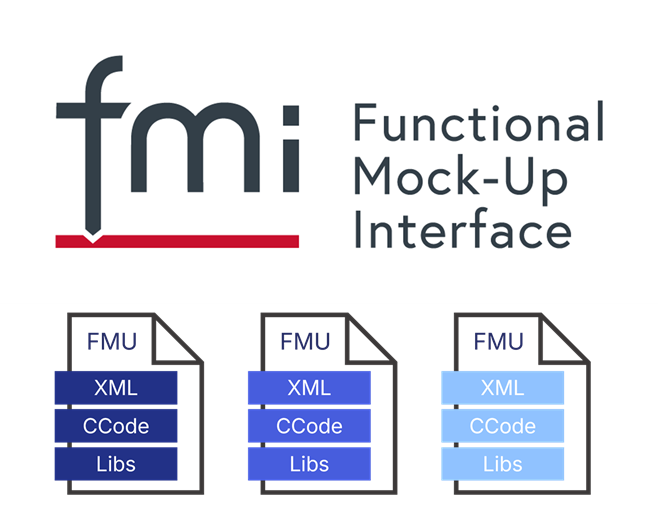
FMUs in Context:
Engineering simulations can get complicated—fast. Whether you’re designing an electric vehicle powertrain or optimizing a grid-scale battery system, chances are you’re juggling multiple tools, models, and datasets. That’s where Functional Mock-up Units (FMUs) come in. They provide a standardized way to package, share, and integrate dynamic models across different simulation environments, making collaboration easier and workflows more efficient.
No more lost-in-translation moments.
In this first article, we’ll break down what FMUs are, why they’re particularly useful for battery modeling, and how they fit into the bigger picture of system simulations.
What is an FMU?
An FMU is a self-contained model that follows the Functional Mock-up Interface (FMI) standard. It bundles together equations, parameters, and depending on the setup, its own solver. By packaging models this way, FMUs make it easy to share and run simulations across different tools without the hassle of re-implementation or manual conversions. FMUs let engineers focus on innovation, not software compatibility.
What Is FMI? The Functional Mock-up Interface (FMI) is an open standard developed to facilitate the exchange of dynamic models between various simulation tools. By defining a common interface, FMI allows an FMU created in one environment to be seamlessly used in another, ensuring consistent behavior and results regardless of the software employed.
Core Features of FMUs
- Self-Contained & Compressed: FMUs come neatly packaged as ZIP archives, bundling XML definitions, parameter files, documentation and any necessary binaries. This makes them easy to share, integrate, and run across different tools.
- Cross-Platform Compatibility: The FMI standard ensures FMUs can be used in a variety of simulation environments, operating systems and system architecture, including MATLAB, Python, and Modelica-based platforms, Windows, Linux or MACOS — no extra conversions needed.
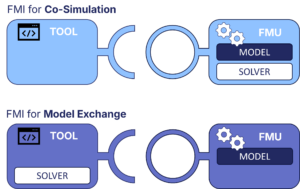
- Flexible Simulation Modes: FMUs support Model Exchange, where the host tool handles numerical integration, or Co-Simulation, where the FMU runs with its own solver. This makes them adaptable for both simple and complex simulations.
- Enhanced Collaboration: By keeping the core physics and behavior intact, FMUs eliminate tool-based restrictions, allowing teams across different disciplines to work with the same model effortlessly.
FMI 2.0 vs. 3.0 FMI 2.0 is currently the most widely used standard, providing robust support for Model Exchange and Co-Simulation. FMI 3.0, released more recently, expands on this by introducing enhanced co-simulation capabilities, improved event handling, and support for structured and array-based data exchange. Additionally, FMI 3.0 allows for more flexible coupling of multiple FMUs within a system simulation, making it particularly useful for complex multi-domain applications. While adoption is still growing, FMI 3.0 represents the next step toward more seamless and scalable cross-platform modeling.
FMUs in Real-World Systems
FMUs are widely used across engineering and energy domains, providing a standardized framework for model integration and system-level simulations. Their ability to encapsulate complex dynamics while remaining compatible with different tools makes them an essential component in a variety of simulation-driven applications.
Examples of FMUs in Engineering and Energy Systems
FMUs are widely used in a variety of fields, including:
- Automotive Powertrains: Engine, electric drivetrain, and battery management system (BMS) models can be shared as FMUs, allowing system integrators to test different configurations without re-implementing models in multiple tools.
- Renewable Energy Systems: Wind turbine, solar panel, and battery storage FMUs can be combined to simulate grid-connected renewable energy systems, optimizing energy distribution and storage strategies.
- Aerospace Applications: FMUs support the modeling of aircraft flight dynamics, control systems, and thermal management, making them valuable for real-time simulations and hardware-in-the-loop (HIL) testing.
- Industrial Automation: Process control systems, robotics, and mechanical components are frequently packaged as FMUs, simplifying integration across manufacturing and automation environments.
- Battery Systems: Battery FMUs enable the simulation of charge-discharge behavior, thermal dynamics, aging effects, and interactions with power electronics and external loads. They play a critical role in electric vehicles, grid storage applications, and portable electronics by helping optimize performance, safety, and longevity.
FMUs in Battery Systems
Battery modeling is complex, bringing together electrochemical behavior, thermal effects, and real-world usage patterns. FMUs offer a structured and standardized way to develop, test, and share battery models while keeping them consistent across different simulation tools.
Why Use Battery FMUs?
- Seamless System Integration: Battery FMUs can be easily added to larger simulations—like electric vehicle powertrains or grid storage networks—without major rework.
- Works Across Different Tools: Whether you’re using MATLAB, Modelica-based platforms, or Python, an FMU keeps the core physics intact, ensuring reliable results across different environments.
- Scales to Different Needs: Battery FMUs can handle everything from simple equivalent circuit models to detailed electrochemical or thermal simulations.
- Modular & Easy to Update: As electrification expands, FMUs make it simple to swap or refine battery models without disrupting entire simulations.
- Faster Development & Testing: Instead of spending time re-implementing models, teams can focus on analysis, optimization, and getting battery-powered solutions to market faster.
By making battery modeling more flexible and efficient, FMUs help bridge the gap between detailed component simulations and full system-level designs, making them a powerful tool for researchers and engineers working on energy storage, electric mobility, and beyond.
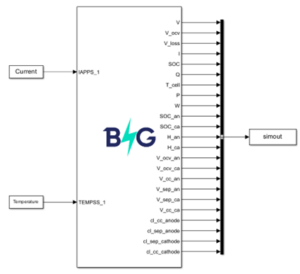
BattGenie is a leader in using physics-based battery models providing the most accurate and fastest digital twins on the edge and in the cloud, and now provide models in FMU format. Be it electric cars, airplanes or power tools, BattGenie’s FMU can help you save significant battery modeling/engineering times by solving these models much faster computationally, as opposed to standard packages such as COMSOL. Contact us at [email protected] for more information.
Looking Ahead
This article introduced FMUs and why they’re a great fit for battery modeling. In the next parts of this series, we’ll dive deeper into:
- Battery FMU Applications & BattGenie’s Approach
- FMU Features & MATLAB Implementation
- Workflow Integration & Real-World Use Cases
By the end of this series, you’ll have a clear understanding of how FMUs can improve battery modeling, how to implement them in real-world simulations, and what makes BattGenie’s FMU stand out. Your models should work for you—not the other way around. If you’re looking to simplify your battery modeling workflow, BattGenie’s physics-based battery FMUs are designed for seamless integration, helping teams speed up design iterations, improve accuracy, and work effortlessly across different tools.
Acknowledgment
We would like to express our gratitude to the FMI community for their valuable references, insights, and feedback, which have greatly contributed to the development of this article. Their expertise and support have been instrumental in advancing discussions on FMU applications in battery modeling and beyond.
Learn More
For those interested in exploring FMUs further, here are some useful resources, example codes, and tools to help you get started:
Resources & Documentation
- FMI Standard & Documentation – Official FMI website with specifications, tutorials, and implementation guidelines.
- Functional Mock-Up Interface by dSPACE – An insightful overview of the FMI standard and its integration within dSPACE tools for simulation and validation.
- MapleSim FMI Support – An overview of MapleSim’s support for FMI, enabling seamless export and import of FMUs for multi-domain modeling, system-level simulations, and co-simulation workflows.
Tools & FMU Development
- FMPy – A Python library for loading, simulating, and analyzing FMUs
- OpenModelica – Open-source Modelica-based environment with FMI support
- MATLAB FMU – MATLAB documentation on importing, exporting, and simulating FMUs in Simulink, including examples and best practices.
Example FMUs & Code Repositories
- Reference FMUs by Modelica – A collection of standardized FMUs for testing and validating FMI compliance across different simulation tools, supporting Model Exchange and Co-Simulation with FMI 1.0, 2.0, and 3.0.
